
Cozi has a fresh new look
 Thursday, July 7, 2016 at 11:53AM
 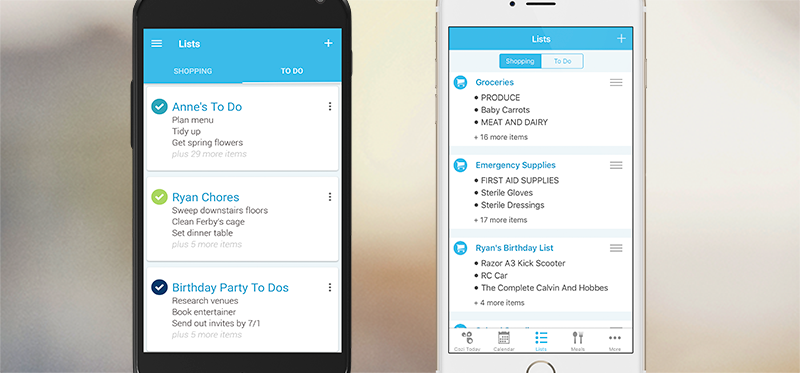 My wife and I have been using Cozi to help coordinate our home lives with each other for a number of years and have found it to be indispensible. Our two primary functions revolves around the calendar and shopping list functions. In one place we have the ability to coordinate our grocery shopping so we don’t have duplication in our store visits. It is also good as a reminder of what we need to do and so on. If there is any question of our plans all we have to do is look at the calendar and we know when and how to coordinate with each other without having to track each other down.
Now Cozi has updated its mobile app as well.
Here’s what’s new in the latest iOS update: They have refreshed the Cozi color scheme with a cool blue in place of the orange. You can also now choose from four different, free themes to personalize your Cozi app. Tap “Change Theme” in the More menu to choose from the new blue “Cozi,” “Anniversary,” “Bloom,” or the orange “Cozi Classic.”
Here’s what’s new in the latest Android update: We’ve refreshed the look of Cozi with a cool blue color scheme in place of orange. You can also now choose from four different, free themes to personalize your Cozi app. Tap “Change Theme” in the main navigation to choose from the new blue “Cozi,” “Anniversary,” “Bloom,” or the orange “Cozi Classic.”
There are some changes in the List function as well. Easily toggle between Shopping and To Do. All of your lists are now accessible in one place within the app under “Lists.” You can toggle between Shopping and To Do by tapping the buttons at the top of the screen, and then you’ll be taken to a screen that shows previews of your lists.
For Cozi’s primary functions it is free but they do have a Gold version that costs $19.99/year. Here is a comparison between the two products.
Demo
For more information go to: http://www.cozi.com/

Reader Comments